EDI upload & mapping
Upload supported shipment files, configure field mappings and company templates, preview and validate rows, then import reviewed data. Review source rows, batch results and history.

CIPHER IESS · IMPORT EXPORT SHIPPING SYSTEM
Import manifests. Export bookings. Container inventory. Documents and billing. One operational workspace for shipping agencies and NVOCC teams.
Shared records. Clear operational steps.
INSIDE THE SOFTWARE
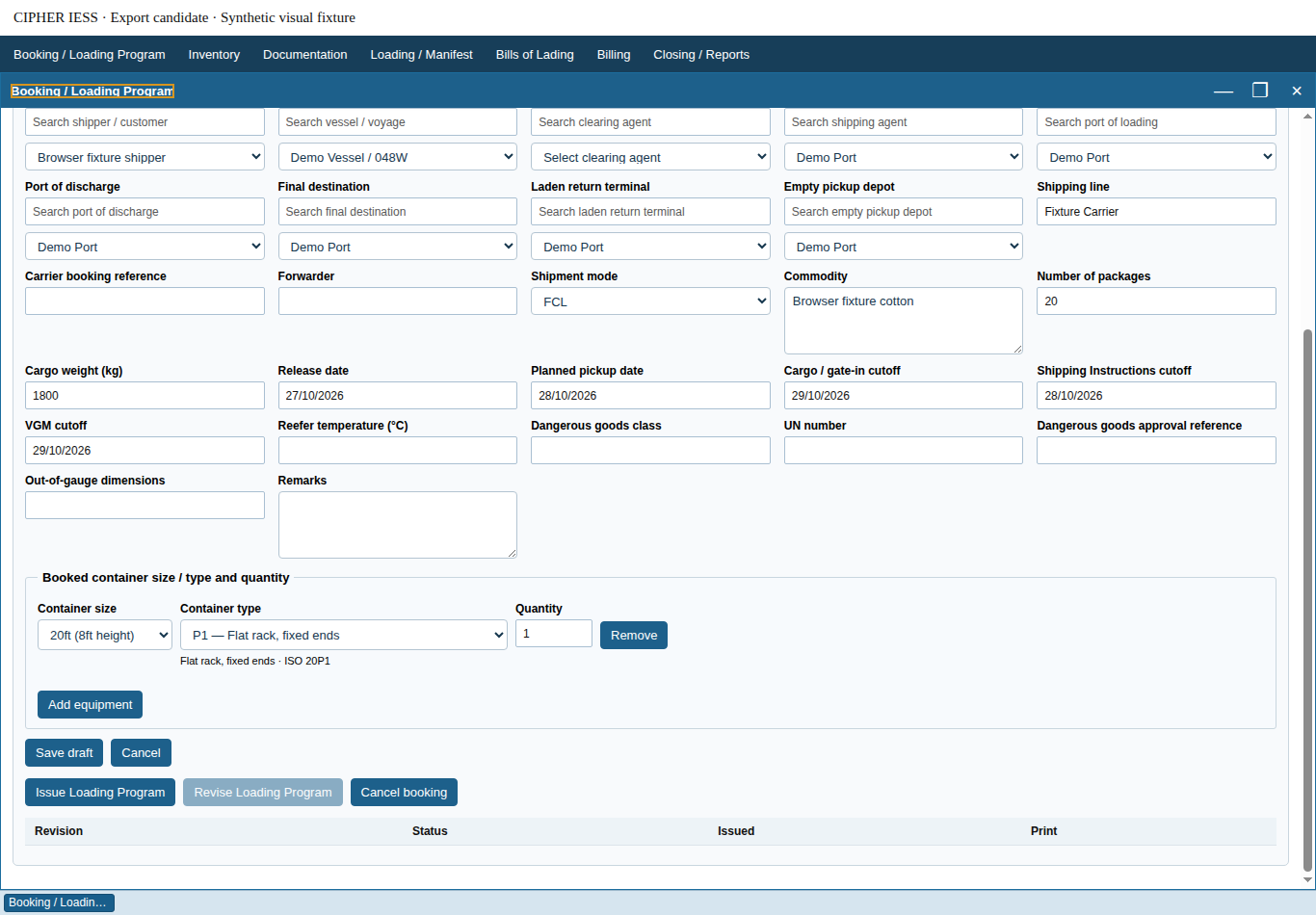
Bring vessel, voyage, cargo, equipment and cutoff information together in the Booking / Loading Program workspace.
01 / IMPORT OPERATIONS
Organize the vessel, B/L, consignee, container and financial records behind each import shipment.
Upload supported shipment files, configure field mappings and company templates, preview and validate rows, then import reviewed data. Review source rows, batch results and history.
Manage vessel/voyage records, B/L-level import manifests and their containers. Use master-data views, B/L indexing and shipment grouping to find and review the relevant records.
Link manifest consignee information to customer records and review mapping history. Maintain customers, clearing agents, depositors, ports, package types and container size/type information.
Configure import charge heads and equipment rates, review charge calculations and apply charges to shipments. Work with USD tariffs and PKR billing calculations, issue invoices and record receipts through the configured Import billing workflow.
Review release readiness, vessel release status, B/L holds, settlement and numbering requirements before issuing a Delivery Order. Access document and receipt print views. Gate Pass output remains draft-only.
Manage free-day records, review uploaded updates, configure detention tariffs and preview detention amounts. Follow container movements, empty returns and depot records as part of the shipment lifecycle.
02 / EXPORT OPERATIONS
Seven connected work areas cover preparation, equipment, documents, loading, financial records and closing.
Capture shipper/customer, vessel/voyage, agents, loading and discharge ports, destination, depot and terminal. Record cargo, equipment size/type and quantity, shipment mode, references and operational cutoff dates. Save drafts, issue or revise the Loading Program and print its record.
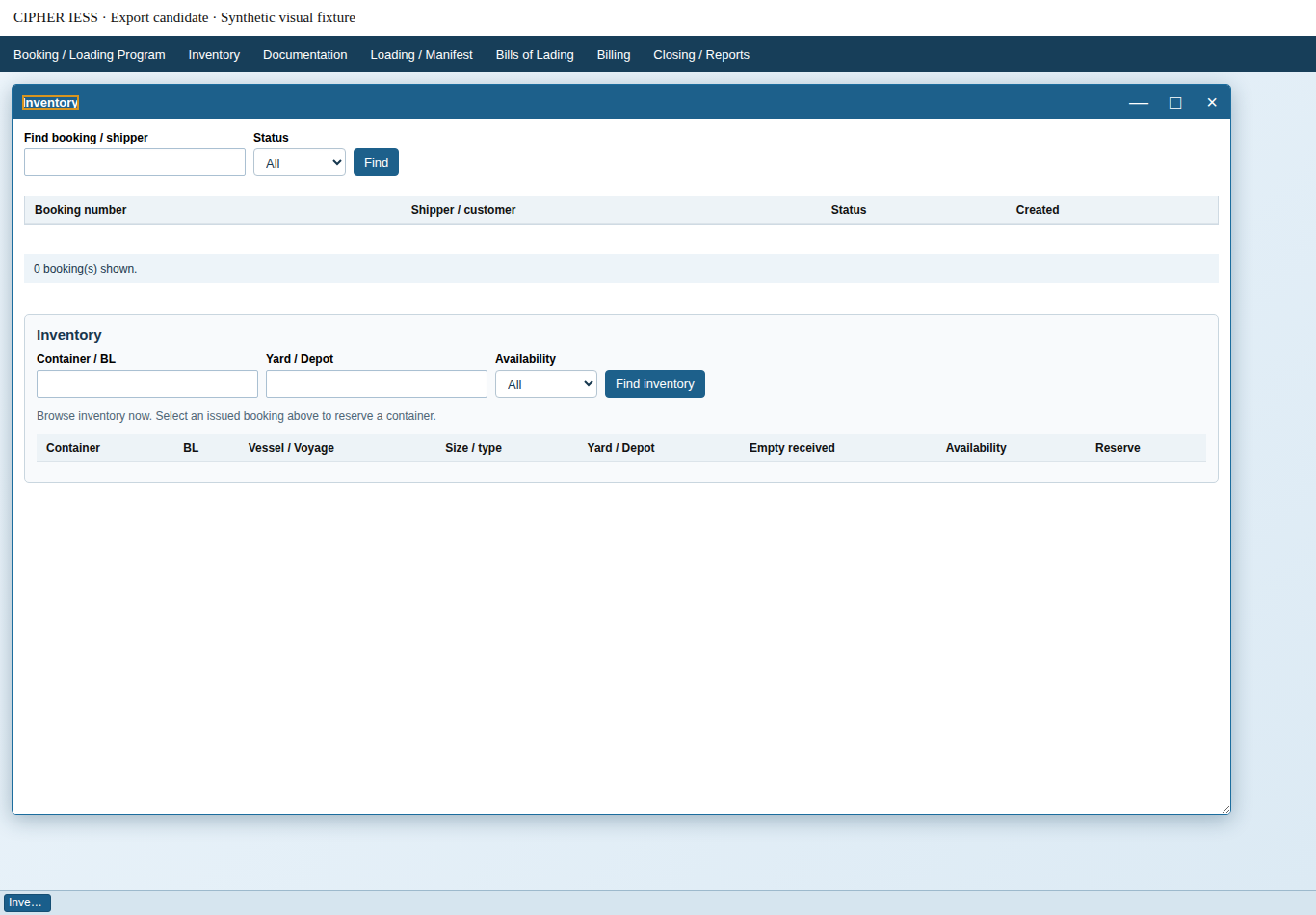
Browse confirmed empty-return inventory by Container/B/L, Yard/Depot and Availability. Select an issued booking to reserve matching equipment. Record pickup, stuffing/seal, gate-in, VGM information, loading, unused reservation release and physical return.
Prepare Shipping Instructions, maintain customs reference/status records, attach supporting files and manage document revisions. These are internal records and print views; customs references are entered and tracked manually.
Follow container loading status, record short shipments and roll eligible containers into another issued booking with matching equipment capacity. Prepare manifest records and record sailing through the Export workflow.
Record B/L number, consignee, notify party, cargo description, freight terms and release type. Maintain draft/issued revisions, print documents and record release or handover. Original, sea waybill and telex options describe recorded release instructions.
Enter charges and expenses, create invoices from selected charges, record receipts and credits against invoices, and review outstanding balances by currency. Export amounts are entered by the operator; automatic tax, exchange-rate and tariff calculation are not included.
Review booking activity and outstanding issues. Closing checks cover sailing/final manifest, document revisions, final B/L handover, unresolved container movements, uninvoiced charges and outstanding invoice balances.
03 / SHARED CONTAINER INVENTORY
Confirmed Import empty returns feed the Export inventory view, carrying the container and depot context into the next job.
Record the Import empty-return event and depot.
Check the container, current cycle and allocation status.
Match equipment size/type and the booked quantity.
Follow pickup, stuffing, gate-in, loading or return.
Missing depots, conflicting or newer Import cycles and active allocations require review or prevent reservation. The software checks operational records; physical container condition still needs your team’s inspection.
04 / NVOCC & SHIPPING AGENCIES
For NVOCC and shipping-agency teams, CIPHER IESS brings together customer and agent references, vessel/voyage details, container allocations, Shipping Instructions, B/L preparation, release tracking and job-level financial records.
Use the Import side for manifest, delivery and return administration, and the Export side for booking, equipment, documentation and closing. Review how these workflows fit your operating model with our team.
NVOCC refers to the operational workflows supported. The software does not confer an NVOCC licence or regulatory approval.
05 / ADMINISTRATION & CONTROL
Maintain operational reference information and document numbering. Configure your approved prefixes and next serials before issuing numbered documents; required numbering is not invented automatically.
Set module-level read/edit permissions and appropriate operational access through the existing role-management tools. Availability of individual actions depends on the user’s assigned permissions.
Review document revisions, booking events, container movements and relevant mapping histories. Issued records and later changes follow the controls of their respective modules.
06 / SCOPE & SETUP
No direct submission integration is included. Customs references, statuses and supporting documents are recorded for internal tracking. Your team completes official submissions through the appropriate external channels.
Carrier references and B/L release instructions can be recorded. Carrier messaging and telex transmission are not integrated services.
Gate Pass output is a draft preview, not completed official Gate Pass issuance. Delivery Orders have a separate release workflow with eligibility, settlement and numbering checks.
Operators enter charges and expenses, then select charges for an invoice. Receipts and credits reduce recorded invoice balances. Export billing does not automatically calculate taxes, foreign-exchange conversion or tariffs.
Review your master data, user permissions, document numbering, Import tariffs and operational processes with our team. Required document series must be configured before numbered bookings or financial documents can be issued. A demo can help establish the modules and setup appropriate to your workflow.
LET’S WALK THROUGH YOUR OPERATION
Tell us about your Import, Export, container and documentation processes.